A CMS library for Next.js, SvelteKit and Express
Content management that lives in your codebase
Define your content in TypeScript, render it with your own components, and give editors an admin at /admin. It runs inside your app, on your host and your database.
import { defineKranthoConfig } from '@krantho/config'

// krantho.com's own configuration. Data only, resolved once at startup:
// defaults, then this file, then the environment.
export default defineKranthoConfig({
  site: {
    domain: 'krantho.com',
    name: 'Krantho',
    language: 'en',
    baseUrl: 'https://krantho.com',
  },
  // The site's own Schema.org identity and collection archetypes, seeded into
  // the database on first boot; /admin → SEO edits them from there
  seo: {
    configDir: './krantho.seo',
  },
  // Pages stay cached until a content change invalidates them
  cache: { pages: 'next-isr' },
})

// In production the environment sets the rest, secrets included:
//   KRANTHO_PERSISTENCE_PROVIDER=postgres
//   KRANTHO_PERSISTENCE_POSTGRES_URL=postgres://…
//   KRANTHO_AUTH=oidc
Install
Add the krantho skills to Claude Code
The krantho plugin gives your coding agent skills to add krantho to a project, design content and page templates, write content and set up structured SEO.
# In Claude Code. The marketplace is read from the descoped/krantho repository,
# which is private during development.
/plugin marketplace add descoped/krantho
/plugin install krantho@krantho
Add krantho to your app
One command installs krantho for your framework. To start a new project instead, run
npx create-krantho my-site.# For the first release: the packages are not on npm yet (see Project status) pnpm add @krantho/next @krantho/server-next @krantho/ui-react @krantho/config @krantho/schema zod# For the first release: the packages are not on npm yet (see Project status) # @krantho/core provides renderContent for load functions pnpm add @krantho/sveltekit @krantho/server-sveltekit @krantho/core @krantho/config @krantho/schema zod# For the first release: the packages are not on npm yet (see Project status) # @krantho/node bundles no UI library: add ui-react, ui-svelte, ui-mui or ui-tailwind. # @krantho/core provides renderContent for the render function pnpm add @krantho/node @krantho/server-node @krantho/ui-react @krantho/core @krantho/config @krantho/schema zod
Krantho is in active development and not on npm yet: these are the commands of the first release. Until then, run it from source.
Problem
You build content sites in Next.js, SvelteKit or Express. The code is yours, but the words on the pages belong to other people, and they need to change them without waiting for your next deploy.
The usual answer is a hosted CMS beside the app: another service to integrate, another bill, another login for editors, and your content in someone else's database, one network request away from your pages. The other answer is markdown in the repository, which works until the first editor who does not use git. Structured data for search engines waits for later, and later seldom comes.
How it works
Define your content
A collection is a Zod schema in
krantho.collections.ts. The schema types your pages, validates every save, and becomes the form editors fill in the admin. Markdown files with frontmatter seed each collection on first boot.import { join } from 'path' import { defineCollection } from '@krantho/schema' import { z } from 'zod' const dir = (name: string): string => join(process.cwd(), 'content', name) const status = z.enum(['draft', 'published']).default('published') const ref = (collection: string) => z.string().describe(`ref:${collection}`) /** Capabilities: cards on the landing page and a page each */ const features = defineCollection({ name: 'features', source: 'filesystem', directory: dir('features'), path: '/features/:slug', schema: z.object({ title: z.string(), description: z.string(), benefit: z.string(), order: z.number().default(99), icon: z.enum(['content', 'admin', 'seo', 'cache', 'media', 'database', 'skills', 'config', 'frameworks']), 'proof-sample': z.string().optional(), 'docs-page': ref('docs').optional(), status, }), })Write your content
Each document follows its collection's schema: fields in the frontmatter, and a markdown body whose
##headings become sections. You write the first documents as files in your repository. Once the site runs, editors write them in the admin, in the form the schema generates.--- title: 'Structured SEO' description: 'Structured data and meta tags from your content.' benefit: 'A JSON-LD graph on every page, with none written by hand.' order: 3 icon: seo docs-page: seo-pipeline status: published --- ## Problem Search engines and AI assistants read structured data, not only text. ## Approach Instead of writing JSON-LD, you choose Schema.org types for the site, each collection and each page.Wire it into your app
One route serves the krantho API and one serves the admin, in the framework you already use. Configuration lives in
krantho.config.tsand the environment. SQLite is the default database; Postgres is the production one.app/api/[...path]/route.tsimport { createApiRouteHandlers } from '@krantho/server-next' import config from '../../../krantho.config' import { collections } from '../../../krantho.collections' // The content API at /api/*: content, media, SEO, auth and the sitemap export const { GET, POST, PUT, DELETE, PATCH } = createApiRouteHandlers({ config, collections, }) // The admin at /admin, in app/admin/[[...slug]]/route.ts: // // import { createAdminRouteHandler } from '@krantho/server-next' // export const { GET } = createAdminRouteHandler()src/routes/api/[...path]/+server.tsimport { createApiHandlers } from '@krantho/server-sveltekit' import config from '../../../../krantho.config' import { collections } from '../../../../krantho.collections' // The content API at /api/*: content, media, SEO, auth and the sitemap export const { GET, POST, PUT, DELETE, PATCH } = createApiHandlers({ config, collections, // Editors preview drafts through a short-lived signed link sitePreview: 'signed-url', }) // The admin at /admin, in src/routes/admin/[...path]/+server.ts: // // import { createAdminHandler } from '@krantho/server-sveltekit' // export const { GET } = createAdminHandler()server.tsimport express from 'express' import { createAdminServer, createHandler, toWebRequest, writeResponseHeaders } from '@krantho/server-node' import config from './krantho.config' import { collections } from './krantho.collections' const api = createHandler({ config, collections, sitePreview: 'signed-url' }) const admin = createAdminServer(config) const app = express() async function send(res: express.Response, response: Response): Promise<void> { res.status(response.status) writeResponseHeaders(res, response) res.end(Buffer.from(await response.arrayBuffer())) } const owns = (prefix: string, path: string) => path === prefix || path.startsWith(`${prefix}/`) // Mounted without a path: the handler routes on the full URL app.use(async (req, res, next) => { if (owns('/api', req.path)) return send(res, await api.handle(await toWebRequest(req))) if (!owns('/admin', req.path)) return next() const url = new URL(`http://localhost${req.originalUrl}`) return send(res, admin({ url, cookie: req.headers.cookie })) })Render your pages
Your page templates read the published version of each document in-process, through the content loader, with no request to your own API. Meta tags and JSON-LD come from the same content. With page caching on, a page stays cached until an editor changes something it shows.
app/(site)/features/[[...slug]]/page.tsximport { notFound } from 'next/navigation' import { SeoJsonLd } from '@krantho/ui-react/server' import { requirePublished } from '../../../../lib/krantho' import { FeatureList } from './list' // /features and /features/<slug>. Rendered on its first request, then cached // until a change in /admin invalidates it (cache.pages: 'next-isr'). // The build reads no content. export const revalidate = false export function generateStaticParams(): { slug?: string[] }[] { return [] } interface Props { params: Promise<{ slug?: string[] }> } export default async function FeaturesPage({ params }: Props) { const { slug } = await params if (!slug) return <FeatureList /> const [name] = slug if (slug.length !== 1 || !name) notFound() const feature = await requirePublished('features', name) return ( <article> <SeoJsonLd collection="features" slug={name} /> <h1>{String(feature.fields['title'] ?? '')}</h1> <p>{String(feature.fields['benefit'] ?? '')}</p> <div dangerouslySetInnerHTML={{ __html: feature.html }} /> </article> ) }src/routes/features/[slug]/+page.server.tsimport { error } from '@sveltejs/kit' import { loadContent, loadJsonLd } from '$lib/cms' // /features/<slug>. Reads happen inside the page render, so each one records // its cache tags: behind a CDN, a change in /admin purges the pages that showed it. export async function load({ params }: { params: { slug: string } }) { const feature = await loadContent('features', params.slug) if (!feature) error(404, 'Page not found') const jsonLd = await loadJsonLd('features', params.slug) return { fields: feature.fields, html: feature.html, jsonLd } } // +page.svelte renders it: // // <h1>{data.fields.title}</h1> // <p>{data.fields.benefit}</p> // {@html data.html}server.ts// server.ts, continued: `app` and `config` come from the API wiring import { renderCachedPage } from '@krantho/server-node' import { loadContent } from './src/lib/cms' // A feature page. Reads happen inside the render, so each one records its cache tags async function renderFeature(slug: string): Promise<{ status: number; html: string }> { const feature = await loadContent('features', slug) if (!feature) return { status: 404, html: '<h1>Page not found</h1>' } return { status: 200, html: `<article>${feature.html}</article>` } } // After the API and admin middleware. Pass req.originalUrl, which keeps the // mount path and the query string a signed draft preview carries. app.get('/features/:slug', async (req, res) => { const request = { url: req.originalUrl, method: req.method } const page = await renderCachedPage(request, config, () => renderFeature(req.params.slug)) for (const [name, value] of Object.entries(page.headers)) res.setHeader(name, value) res.status(page.status).type('html').send(page.html) })Bring the edits home
Content moves both ways between your repository and your database. Export what editors have written back to markdown files and commit them, so content is reviewed and versioned with the code. A deploy built with a content manifest imports the new and changed files. A document an editor has changed since keeps the editor's version, the clash is recorded as a conflict, and the database gets a checkpoint before anything is imported.
krantho export pages --out content/pages
git add content/pages
git commit -m "content: the editors' changes"
Capabilities
Content and collections
Your content model is code you review, type-check and version with the site.
The admin
Editors get an admin without you building one, whichever framework the site uses.
Structured SEO
Every page carries a connected JSON-LD graph without anyone writing JSON-LD by hand.
Rendering and page caching
Visitors get cached pages, and editors see their changes without waiting for a timeout.
Your framework
You keep the framework and components you know, and krantho fits around them.
Your database
Your content stays in a database you own, and moving from SQLite to Postgres is a configuration change.
Media on any store
Media files live where your site runs, and the choice is one configuration value.
Typed configuration
The same code runs on every host; what differs between them is configuration you can read in one place.
Agent skills
Your coding agent works from krantho's own guidance instead of guessing at an API it has not seen.
Your stack, your host
Frameworks
Krantho for Next.js
Server components read published content in-process, and each page stays cached until an editor changes what it shows.
@krantho/next@krantho/server-next@krantho/ui-reactKrantho for SvelteKit
Load functions read published content in-process, and a CDN in front can keep each page until an editor changes it.
@krantho/sveltekit@krantho/server-sveltekit@krantho/ui-svelteKrantho for Express and Vite
The API and the admin mount as middleware, and your server-side render reads published content from the same database.
@krantho/node@krantho/server-node@krantho/ui-react
Hosts
| Host | Kind | Frameworks | cache.pages |
|---|---|---|---|
| Amazon CloudFront | CDN | Next.js, SvelteKit, Express | cdn |
| Google Cloud CDN | CDN | Next.js, SvelteKit, Express | cdn |
| Node.js server | Server | Next.js, SvelteKit, Express | none |
| Vercel | Platform | Next.js, SvelteKit | next-isr |
For editors
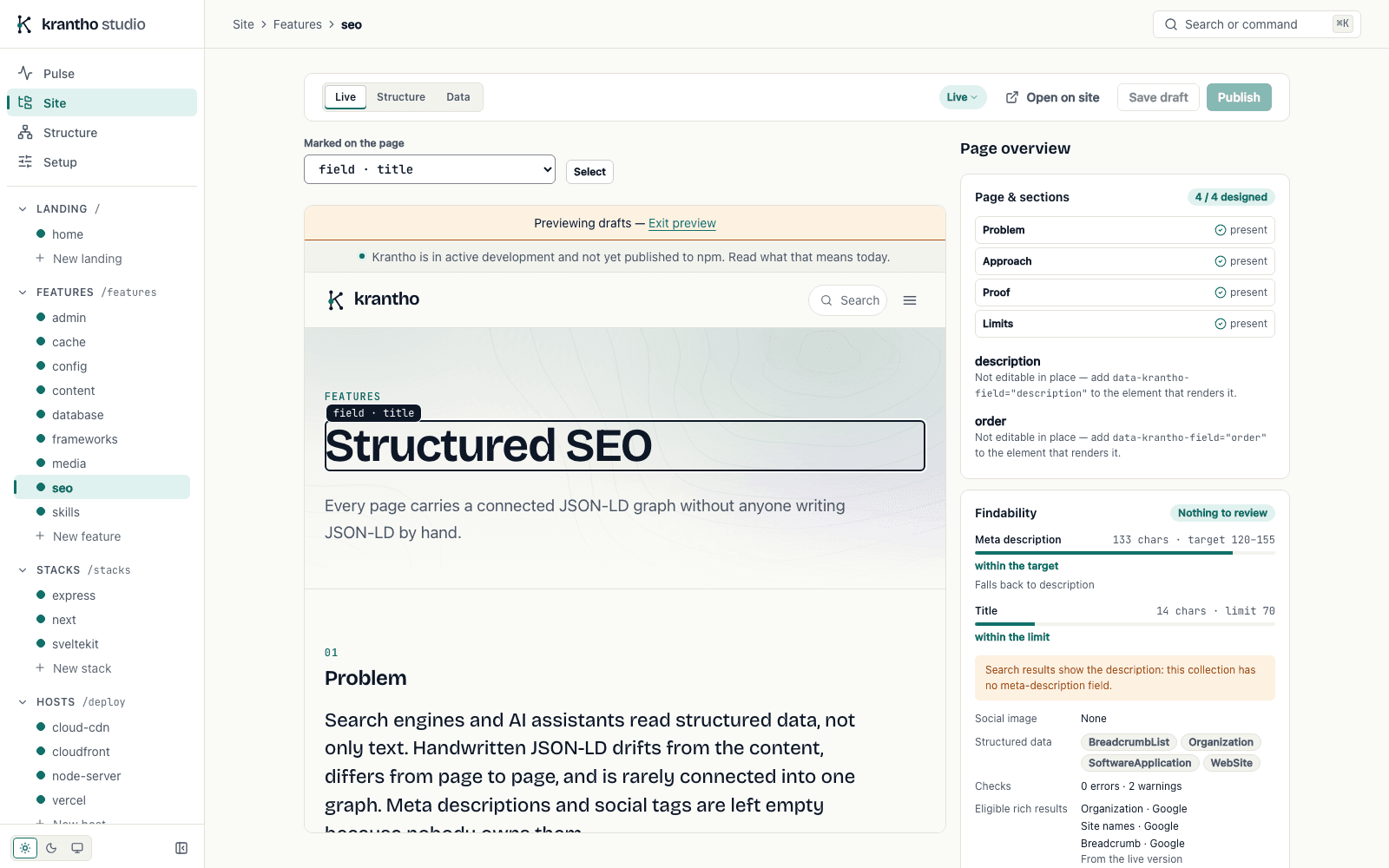
Editors work in one admin, the same for every framework, served by your app at /admin.
- Forms from your schemas. Text, selects, dates, tags, references to other documents and media pickers, all generated from the collection's schema.
- Drafts and publishing. Saving leaves the live page as it is. Publish makes the new version live.
- Preview on the site. Where the site turns it on, an editor opens a draft on its real page before publishing it.
- Version history. Every save is a version, with a diff view and restore.
- Media. A library with folders, tags, alt text, cropping and hotspots.
- SEO tools. Site identity, Schema.org types per collection, a JSON-LD graph browser for each document, search and social previews, and AI enrichment on request.
- An assistant, when you turn it on. A chat in the admin that finds, drafts and improves content and SEO on the language model you choose. It saves drafts, and waits for your confirmation before it publishes or replaces anything.
- Sign-in and roles. An access token or any OIDC provider, with admin, editor and viewer roles.
Fit
Krantho fits when
- You build the site yourself in Next.js, SvelteKit or Express with Vite, and want the CMS inside the same codebase.
- Editors need to change text, pages and media without a deploy.
- You want to choose the host, database, CDN and media store, and be able to change them later through configuration.
- Structured data matters for how search engines and AI assistants read your site.
- Your content fits collections of documents: fields, plus a markdown body with sections.
It is not the right fit when
- You want a page builder or a visual site designer. In krantho, editors change content; layout is code.
- You want a hosted service that someone else runs. Krantho runs inside your app, on your infrastructure.
- The site must be purely static files. The API and the admin need a Node.js server runtime.
- Your frontend is built on a framework krantho has no adapter for.
- You need to install from npm today. Krantho is in active development and not yet published.
Questions
Can I install krantho from npm today?
No. Krantho is in active development, and its packages are not yet published to npm: installing create-krantho or any @krantho/ package fails today. The install commands in the documentation describe what the first release will use.
Until then, krantho runs from source: you build the packages in the krantho repository and run one of its example apps. The repository is private for now, so this works for collaborators. The project status page has the steps.
Is krantho a hosted service?
No. Krantho is a set of packages that runs inside your own app. Your app serves the API at /api and the admin at /admin, your content lives in your database, and your media in the store you choose. There is no krantho account and no krantho server to sign up for. You host the site, as you would without a CMS.
How is krantho different from a headless CMS?
A headless CMS runs as a separate service, and your site fetches its content over the network. Krantho runs in the same app as your site. Page templates read published content in-process, through the content loader, and the admin is served by your own routes. The content model is Zod schemas in your codebase, reviewed and versioned with the site.
You still have an API. Everything the admin does goes through a REST API, described by an OpenAPI 3.1 specification at /api/openapi.json, so other tools and the krantho command-line tool can work with the same content.
Does krantho work with my framework?
Krantho has adapters for Next.js (the App Router), SvelteKit, and Express, with a Vite plugin for development. For rendering, @krantho/ui-react, @krantho/ui-svelte, @krantho/ui-mui and @krantho/ui-tailwind are alternatives; rendered HTML carries semantic class names, so plain CSS works too.
The admin is the same React application on every framework, so a SvelteKit site ships it without React in its own pages. Other frameworks, such as Astro or Nuxt, have no adapter. The Node handler takes a Web Request and returns a Response, so it can be wired into other servers by hand.
Which databases does krantho support?
SQLite and Postgres. SQLite is the default: one file, suited to development and to a single server with a persistent disk. Postgres is the production database, and the one to use on serverless hosts, which have no persistent disk. Switching is configuration: KRANTHO_PERSISTENCE_PROVIDER=postgres and a connection URL, plus the adapter's package.
A third backend reads and writes the markdown files directly, with no version history and no media. It is meant for development.
Webhook deliveries are logged and retried on both. Other databases need a custom adapter that implements IPersistenceAdapter.
Where does my content live?
In your database, SQLite or Postgres, reached through one adapter interface, IPersistenceAdapter. Every save appends a version, so the history stays with the content. Media metadata is stored in the same database, and the files in the store you choose: local disk, Vercel Blob, an S3-compatible bucket or Google Cloud Storage.
Markdown files in your repository seed an empty database on first boot. After that, the database is where editors work.
Content leaves your infrastructure only if you turn on AI enrichment: the content being enriched is then sent to the LLM provider you configured.
What happens to cached pages when an editor publishes?
With page caching on, every page records cache tags for what it read — the document, the lists it shows, the site's globals — and every committed write announces what it changed. Publishing invalidates the tags that change affects, so only the pages that show it are refreshed: in Next's cache under next-isr, or with a purge at the CDN under cdn.
A save changes nothing visitors see, so it refreshes nothing. Without page caching (none, the default), every request renders the page from the published version.
Does the AI enrichment require Anthropic?
No. Enrichment runs through @krantho/ai, which speaks to Anthropic, OpenAI, Gemini, OpenRouter and Ollama. Anthropic is the default provider; the site's configuration chooses another, and Settings in the admin can change the provider and model later. Ollama runs locally and needs no key.
Enrichment is optional. Structured data, meta tags and the admin's SEO tools work without it. When it runs, it fills missing meta descriptions and Schema.org properties, and never overwrites what an editor wrote.
Get started
The documentation starts with what krantho is and walks you through a first page on your stack. Krantho is not on npm yet: the project status page explains how to run it from source today.